Gmail and MobileMe – Living Together in Perfect Harmony

Tuesday, July 15th, 2008

I’ve been using Gmail for about 4 years now, and it’s pretty much become the centre of my email life, with my various email accounts being funneled into Gmail. I’ve used it with both the web client, and Mail.app on my Mac via IMAP, and have been pretty happy with both.

With the release of MobileMe and the iPhone 3G I made the decision to move to MobileMe (an Apple fanboi at heart, I wanted to keep it all within the one happy family – particularly seeing as work just bought me a MacBook Air.) But I was really reluctant to stop using Gmail as the repository of all of my email, both received and sent (awesome search, archiving and just to have a backup on another server).

It’s relatively easy to setup forwarding from Gmail through to MobileMe, which you then add to your mail client (Mail.app on the Mac) and the mail will come in as per normal. But this would mean that any sent items won’t appear in Gmail, which in turn means that Gmail is only storing half of the picture. But with adrianlynch doing most of the legwork, we were able to work out a solution.

There are quite a few little things that need to be done in order to fine tune the setup, particularly if you want to use multiple email addresses. I’ll cover those, and then get to the meat of the setup.

Multiple email addresses in Gmail.

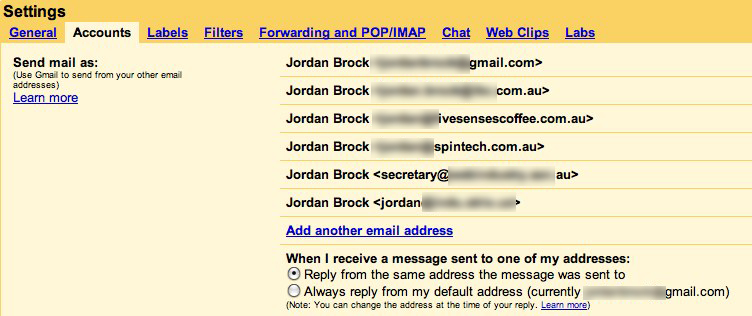
Gmail has had the ability to support multiple email accounts for quite a while, and it all works quite well. First of all, sign into gmail, then go to the settings -> Accounts tab. The bet we’re interested in is the “Send Mail As” bit. You can add all of the email addresses you want to have gmail send email for in here. Gmail will send a confirmation email to the address you enter (just to make sure that you are in fact billg@microsoft.com).
Setting up the email forwarding

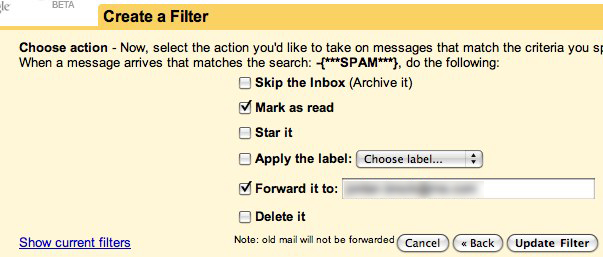
There are two ways to forward email in Gmail. One is in the Settings -> Forwarding and POP/IMAP tab, which will forward every message to the address you specify. The other way is via a Filter (Settings -> Filters). I prefer to use the filter, because it allows me to get rid of some of the cruft mail that I don’t really ever want to see again (eg, one of my mail accounts flags spam as *SPAM* … if I didn’t setup a filter to not forward this, I’d receive all of those emails in MobileMe, which is sub-obptimal to say the least).
Setting up your computer

Of course, this assumes you’re using a Mac. If not, I’m sure you’re a smart enough person to work it out :)

MobileMe setup

First up, add your MobileMe account. It’s pretty simple. Just enter your MobileMe account details (same as your old .Mac account), and it should all be jake.

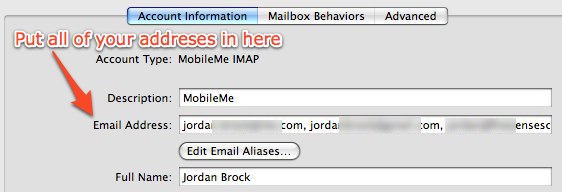
If you’ve setup gmail to handle multiple email addresses, enter them all in the “Email Address” field, separated by commas.
Gmail setup

Now, you need to add your gmail account to the system, as an IMAP account. Follow the instructions on the Google Help Center

Once you have added the account Mail.app will probably start downloading all of your mail from Gmail, which could take a fair while. This may or may not be something you want: your choice.

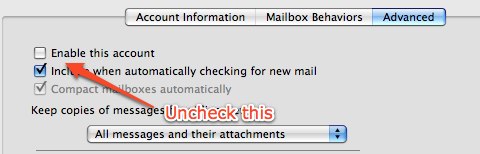
After the mail has all downloaded, go into the Advanced tab for the Gmail account in Mail.app, and uncheck “Enable this account.”
Then, go back into your MobileMe account and set the outgoing SMTP server to smtp.google.com. All of your sent mail will now go through Gmail, which is great for archiving purposes. Because MobileMe is an IMAP server, it will automatically be copied up to the MobileMe server (because it’s storing a copy in your Sent Items folder on your Mac), which means it’s then available on all the computers you use MobileMe with, including your iPhone / iPod Touch.

Why did I enter the multiple email addresses?

If you have multiple email addresses, and you entered them all in the “Email Address” box earlier, you will now have the option to choose which address to send your mail as when you create a new message.

There’s one little gotcha here, and it’s why I mentioned setting up the addresses from within gmail before. If you try to send a message from an email address that Gmail doesn’t “know” about, it will replace the sender email with your Gmail address. This is obviously to stop you spoofing your address, but it took me a little while to work that bit out. So, just make sure that you’ve defined all the addresses that you want to “Send As”

Setting up your iPhone / iPod Touch.

Once you have the above system up and working, you can basically mirror that setup on your iPhone. You need to create both accounts under “Mail, Contacts, Calendars” in the Settings application. Then disable the Gmail account, and set the outgoing SMTP server to gmail in the MobileMe setup.

Push Goodness.

If everything has gone according to plan, you should now have your Gmail “pushing” to your iPhone, and also appearing on your computer. And if you have multiple macs, and have sync turned on for “Mail Accounts” and “Mail Rules and Smart Folders”, then you will shortly have those settings on both of your computers.

Share and Enjoy:
  • TwitThis
  • FriendFeed
  • del.icio.us
  • Digg
  • Facebook
  • LinkedIn
  • StumbleUpon
  • Reddit
  • E-mail this story to a friend!
  • rima
    You mention go back into your MobileMe account and set the outgoing SMTP server to smtp.google.com. I cannot find where to do this in Mobile me? can you please direct me?
  • rima, go into the Settings application on your iPhone, choose “Mail, Contacts, Calendars”, choose MobileMe and then you should have the option to choose which SMTP server you want to use. For reference, look at the screenshots above. If you can't find it, please let me know.
  • raf
    in this way, i'll have double copy of my email (inbox and sent mail) either in mobileme and in gmail (i mean, webmail)...
    instead, in my mac, having disabled gmail account, i'll only have the mobileme copy...

    just one thing: all this work just with email i'll receive from the moment i apply all this changes, right?
    for the past email how can i do to have them in mobileme webmail, and in my mail.app?
    could i just drag & drop from mail.app to inbox folder of @me.com account? but in this way, would i lose any information, as sender, date etc?

    thanks for your beautiful post! :)
  • raf
    p.s.: infact, if i uncheck the gmail imap account in mail.app, all the emails are not more shown in mail.app :(
  • You should be able to copy your emails from your gmail IMAP folders over to your MobileMe account, and then have access to your archive.
  • Yes, but what about searching for archived email through the mail.app interface?
    Does gmail push those as well?
  • Joel, Unless you enable gmail in mail.app, you won't see those emails. One way around this is to enable gmail in Mail.app, and then copy all your gmail archived mails over to your MobileMe account, and then disable gmail. Of course, you'll then have 2 copies of everything (even though you'll only see one), but that's a good thing.
  • octopus
    When I unckeck 'enable this account' I cant view any of the GMail mail in my Mac Mail. Why wouldnt you want to be able to view your gmail mail on your mac mail?
  • octopus
    Also, this process doesnt allow the ability to store an email to the @me address on the Gmail account, only a reply to an @me email. So you still dont get the full picture on the Gmail archive unless you respond to all @me emails through your google server.

    Or is there a way?
  • octopus, you're right. Any mail sent directly to your MobileMe account will bypass the gmail accounts. Of course, you could setup a rule in Mail.app to forward any messages sent to an @me.com account to your gmail account, and then archive them. I prefer to only have the one gmail address that I give out, so this isn't the biggest problem.
  • will
    You sir are a gangster!!! lol Thanks
  • James Sherratt
    cant I just have my gmail go into mobile me just like I can have outlook?
  • Kranos
    Hi,

    I've followed all of this and it works perfectly apart from one thing - all email that I send is from my .me account i.e. xxx@me.com as opposed to xxx@gmail.com.

    Any ideas how to fix this?

    Kranos
  • Charlie
    Yeah, I'm having the same problem as Kranos. I set the outgoing server as smtp.gmail.com with all my login info, ssl, and correct port and everything. But for some reason my phone is still sending everything from xxxx@me.com rather than gmail.com. Not a huge deal, since I don't really care which address people reply to as long as it gets to me, but it'd be nice to have something standard without having to change my address entirely.

    But otherwise, great post. Really very helpful.
  • Charlie
    Oops. Kranos/others having this issue -

    I don't know if this was the intended way to do this, but: if you're sending email from your iPhone, like a reply, just tap where it says "Cc/Bcc, From" under "To" and it will expand to three lines. Tap "from" again, and it will give you the choice of sending from your Gmail address or your MobileMe address. Tap your Gmail address, and you're all set! Same thing for Mac Mail: when you're sending an email, just click on the "from" dropdown box and select which address you want.

    Though, you also have to also have your Gmail account activated on your phone. Which actually doesn't matter as long as you followed this posts instructions by doing the filter and marking all emails as read, so you don't get repeat notifications. Then just work from your MobileMe account in the Mail app on your iPhone, and you should be good to go.

    Hope this helped.
  • Raghu
    Check out this great article on merging your gmail & mobileme accounts.

    http://www.davesouth.org/stories/gmailme-a-mash...
  • macdaddy
    thank you...worked so far..!
  • Vadym
    HM, so at the end of the day you have two active accounts, one of which is absolutely redundant, and that is me.com

    Data plan is unlimited so pulling gmail every 10 or so minutes should do the trick. All push solutions I've seen so far are ugly to say at least. Btw, one can get the same crooked setup with mail2web, which is at least free.

    But great attempts and it's a pity Apple and Google still can't put their shit together
  • alloallo
    MobileMe is not redundant, it just doing the push for you to your iphone/touch; and the instructions worked well for me overall. Great stuff, thanks.
  • Vadym
    Let me try to clarify what I mean by my non-superlative comment:
    1. Push functionality on iPhone is available through two content providers: MobileMe and Exchange. There is a free alternative to MobileMe, which is mail2web. It support Exchange push protocol.
    2. Having two email repositories, gmail and MobileMe, being setup on the phone IS redundant in terms of:
    a. Data storage
    b. Data management, since one needs manually synchronize deleted mails, etc
    3. Lack of gmail push functionality is unfortunate and should be engineered by Apple/Google in order to avoid poor design people ought to use in order to get real-time notification
  • Mario
    Hello, thank you for this tutorial, I think it's working for me so far.

    To all of you:
    Does it work, if you send a mail from your Gmail to your Gmail? If I do this, the mail is visible just at the Gmail-Webinterface and not in Mail.app. When I send a mail to my Gmail from the me.com-webinterface/@me.com-adress, it seems to work.

    In short, forwarding does not work for me if the mail is sent from the same email adress.
    Sure, this is not a big deal, but I just wanted to know if it is normal.

    Thank you

    Regards from Austria
  • Vadym
    I would assume there is a risk of an infinite loop otherwise
  • Name
    The drawback is you can't use the web interface of mobileme to send mail with a from address not being the mobileme one.
  • hoody
    ok, I must be stupid as I can't follow half the instructions above. I've set my gmail to forward to my mobileme account, easy. I've then set my gmail account up in Mail as an IMAP account.

    Then I'm stuck. Where do you set the outgoing smtp account? In mobileme? If so via the me.com site or in the preferences in the Mac (I cant see any option in either?)

    I'm just trying to sync my iMac, Macbook and iPhone so they are all in showing the same gmail no matter what device I've viewed/deleted mails on.... I know have no mail coming into my Mail account on my macbook
  • matt
    Hey Jordan! This is great! I got so frustrated with the mobile me web interface, when I had to type longer emails than I wanted to on my phone. I got all this working.

    2 questions for you, if you have time...
    1. if all I want to do is use gmail / mobileme for checking e-mail thru the web, but leave my iphone / Mac the same, do I need to set up the push and other accounts?

    2. Can you sync the calendars thru mobile me / gmail?

    Thanks a lot!
  • blake7
    Good article and one I have followed and set-up. Just to confirm one point - if I received a message to joe@example.com and I want to reply from the iPhone do I have to include the example.com email account. Mac Mail makes it easy to reply by adding multiple domains to the set-up, however, this does not seem to be an option on the iphone. That being the case this is not really a good iphone solution - more an issue with the iphone.

    Thanks for getting this far with trying to get to a single mail account, while trying to keep multiple domain addresses!!!!
  • chanelle alvarez
    i found your article very useful but the issue i having is when i login to me.com i want to see my gmail not only on my computer but in my mobileme cloud... it gives me the option but im not sure what it is i need to plug in apple told me to contact gmail but i have not received a response
blog comments powered by Disqus